Beautiful AI is reshaping how professionals create presentations, leveraging artificial intelligence to streamline design and storytelling. This innovative tool simplifies the process of crafting visually stunning slides, reducing the burden of manual design. From corporate pitches to educational content, Beautiful AI is setting new standards for efficiency and creativity in communication.
Introduction & Context
In an era where time is a precious commodity, the demand for tools that enhance productivity without sacrificing quality has never been higher. Enter Beautiful AI, a groundbreaking platform designed to revolutionize the way we create presentations. Gone are the days of wrestling with clunky design software or spending hours aligning text boxes. Beautiful AI automates the process, allowing users to focus on what truly matters: their message.
The journey to this innovation is rooted in the evolution of AI and its integration into creative industries. Over the past decade, artificial intelligence has transitioned from a niche technology to a mainstream tool, influencing everything from graphic design to content creation. Beautiful AI stands at the intersection of these advancements, offering a solution that combines technical sophistication with user-centric simplicity.
Today, presentations are a cornerstone of communication, whether in boardrooms, classrooms, or virtual meetings. Beautiful AI’s relevance lies in its ability to democratize design, making professional-quality slides accessible to everyone, regardless of their artistic skills.
Description
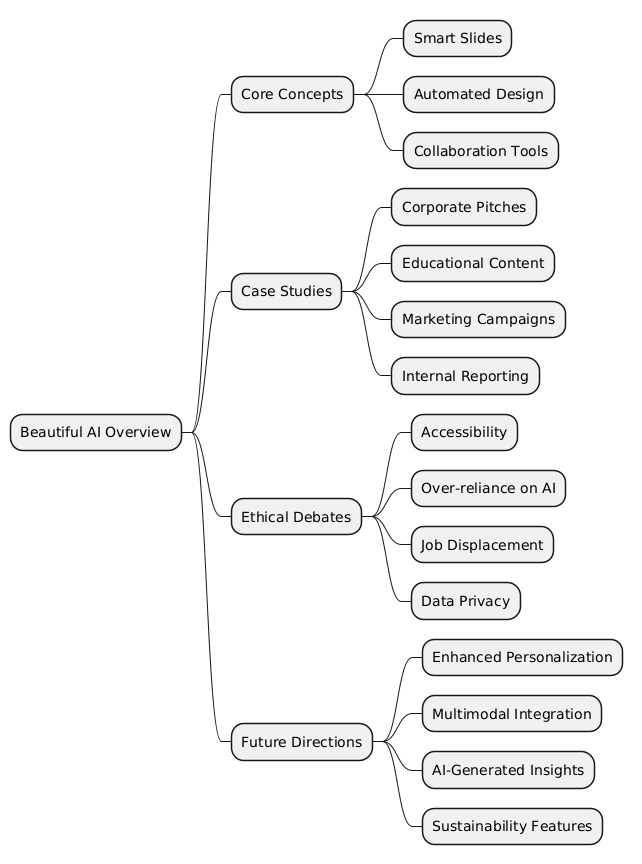
Beautiful AI is an intuitive platform that leverages artificial intelligence to simplify and enhance the process of creating presentations. Its core feature is the use of “smart slides,” which adapt dynamically to the content provided by the user. This means that as you add text, images, or data, the slide automatically adjusts its layout to ensure a polished, professional appearance.
Key features include:
- Automated Design: AI-driven algorithms ensure consistency and aesthetic appeal across all slides.
- Customizable Templates: Users can choose from a variety of themes tailored to different industries and purposes.
- Collaboration Tools: Teams can work together in real-time, streamlining the review and editing process.
- Integration Capabilities: Beautiful AI integrates seamlessly with platforms like PowerPoint, Google Slides, and Slack, enhancing its versatility.
By eliminating the need for manual adjustments, Beautiful AI empowers users to focus on crafting compelling narratives, rather than getting bogged down by design minutiae.
Use Cases
1. Corporate Pitches
Imagine a startup founder preparing for a critical pitch to investors. With Beautiful AI, they can quickly create a visually engaging presentation that highlights their business model, market opportunity, and financial projections. The platform’s smart slides ensure that the design aligns with the content, leaving a lasting impression on potential investors.
2. Educational Content
Educators and trainers often struggle to create engaging materials that capture their audience’s attention. Beautiful AI simplifies this process by offering templates designed for educational purposes. Whether it’s a lecture on climate change or a workshop on digital marketing, the platform helps educators present complex information in an accessible and visually appealing way.
3. Marketing Campaigns
Marketing teams frequently need to pitch creative ideas to clients or internal stakeholders. Beautiful AI allows them to create slides that not only look professional but also effectively convey their vision. Features like data visualization tools and customizable themes make it easier to communicate key metrics and creative concepts.
4. Internal Reporting
For HR professionals or project managers, Beautiful AI is a game-changer for internal reporting. Whether it’s an employee performance review or a project status update, the platform enables users to present data and insights clearly and succinctly, fostering better decision-making within organizations.
How to Use Beautiful AI
Using Beautiful AI is straightforward, even for those with minimal technical expertise. Follow these steps to get started:
- Visit the Platform:
Access Beautiful AI at https://www.beautiful.ai. - Create an Account:
Sign up for a free account or explore premium options for additional features. - Select a Template:
Choose from a range of templates tailored to different purposes, such as business, education, or marketing. - Add Content:
Input your text, images, and data. The AI will automatically adjust the layout to ensure a cohesive design. - Customize:
Personalize your slides by selecting color schemes, fonts, and animations that align with your brand or message. - Collaborate:
Invite team members to review and edit the presentation in real-time. - Export or Integrate:
Download your presentation in various formats or integrate it with tools like PowerPoint and Google Slides for further use.
Beautiful AI’s user-friendly interface and robust features make it an invaluable tool for professionals across industries.
Ethical Debate
Pros
- Accessibility: Beautiful AI democratizes design, enabling individuals without graphic design skills to create professional presentations.
- Efficiency: By automating time-consuming tasks, the platform allows users to focus on content rather than layout.
- Collaboration: Real-time editing fosters teamwork and reduces the back-and-forth typically associated with presentation design.
Cons
- Over-reliance on AI: There’s a risk that users may become overly dependent on the platform, potentially stifling creativity.
- Job Displacement: As AI tools become more sophisticated, there’s concern about their impact on graphic designers and other creative professionals.
- Data Privacy: The integration of cloud-based tools raises questions about the security of sensitive information.
Societal Implications
Beautiful AI exemplifies how technology can bridge skill gaps and enhance productivity. However, it also underscores the need for ethical guidelines to ensure that such tools are used responsibly. As AI continues to permeate creative industries, striking a balance between innovation and ethical considerations will be crucial.
Future Directions
Beautiful AI represents just the beginning of what’s possible in AI-driven design. Here are some potential advancements:
- Enhanced Personalization: Future iterations could offer more granular customization options, allowing users to create truly unique presentations.
- Multimodal Integration: Combining text, audio, and video capabilities could make Beautiful AI a one-stop-shop for all presentation needs.
- AI-Generated Insights: Imagine a tool that not only designs your slides but also provides data-driven recommendations for improving your message.
- Sustainability Features: As organizations prioritize eco-friendly practices, Beautiful AI could incorporate features to calculate and offset the carbon footprint of digital presentations.
As AI technology evolves, Beautiful AI is poised to remain at the forefront, continually redefining the standards of presentation design.
Mind Map
Key Takeaways
- 💡 Insightful Idea: Beautiful AI simplifies presentation design, enabling users to focus on content rather than layout.
- ⚠️ Warning or Challenge: Over-reliance on AI tools could stifle creativity and raise ethical concerns.
- 🔍 Key Detail or Discovery: The platform’s smart slides dynamically adapt to user input, ensuring a polished design.
- 🚀 Future Opportunity: Advancements in AI could make Beautiful AI a comprehensive tool for multimedia presentations.
- 🌍 Societal Impact: By democratizing design, Beautiful AI empowers individuals and organizations to communicate more effectively.
Beautiful AI is more than a tool—it’s a glimpse into the future of communication and creativity.