AI-powered Chrome extensions are redefining how we interact with the web. These tools streamline workflows, enhance productivity, and personalize user experiences. This article explores their functionality, real-world applications, ethical considerations, and future possibilities.

Introduction & Context
In the ever-evolving landscape of artificial intelligence, Chrome extensions serve as the bridge between advanced AI capabilities and everyday internet users. These small yet powerful tools integrate AI functionalities directly into the browser, enabling users to perform complex tasks such as real-time translations, content creation, and data analysis with ease.
The journey of AI-powered Chrome extensions began as a response to the growing demand for productivity tools that could keep pace with the digital age. Over the years, these extensions have evolved from simple utilities to sophisticated AI companions. Today, they are not just add-ons but essential components of modern digital workflows, offering unparalleled convenience and efficiency.
The relevance of these extensions is underscored by their widespread adoption across industries—from education and marketing to software development. As AI continues to grow more accessible, Chrome extensions are becoming a critical touchpoint for users to harness its power without needing specialized skills.
Description
Chrome extensions for AI are specialized programs that enhance the browser’s functionality by integrating artificial intelligence capabilities. These extensions operate as mini-applications embedded within the Chrome browser, offering features such as natural language processing, real-time data scraping, and personalized recommendations.
For instance, extensions like “ChatGPT for Chrome” or “Sider” allow users to access AI-driven conversational tools directly from their browser tabs. Others, such as Grammarly, provide real-time grammar and style corrections powered by advanced language models. These tools are designed to operate seamlessly within the browser environment, ensuring a smooth and intuitive user experience.
What sets these extensions apart is their ability to process and analyze data in real-time. Whether you’re drafting an email, conducting research, or optimizing a website for search engines, AI-powered Chrome extensions act as intelligent assistants, streamlining tasks that would otherwise require significant time and effort.
Use Cases
1. Content Creation and Editing
One of the most popular applications of AI Chrome extensions is in content creation. Tools like Grammarly or ChatGPT Sidebar enable users to write, edit, and refine text effortlessly. For example, a freelance writer can use Grammarly to ensure their blog post is error-free while leveraging ChatGPT to brainstorm ideas or generate outlines.
2. Research Assistance
Extensions such as “ChatGPT for Google” transform the research process. Imagine a university student working on a thesis. Instead of manually sifting through countless search results, the extension provides summarized insights directly on the search engine results page, saving hours of effort.
3. Web Development
For developers, AI-powered extensions like “Code Snippets AI” simplify the coding process. These tools can generate code snippets, debug errors, and even suggest optimizations. A software engineer working on a tight deadline can rely on these extensions to accelerate their workflow.
4. E-commerce and Marketing
Marketers use extensions like “AdCreative AI” to design and optimize ad campaigns. By analyzing user data and market trends, these tools generate high-performing ad creatives in minutes. For instance, an e-commerce manager can create visually appealing ads tailored to their target audience without needing graphic design expertise.
How to Use Chrome Extensions for AI
Using AI-powered Chrome extensions is straightforward. Follow these steps to get started:
- Access the Chrome Web Store:
- Visit Chrome Web Store.
- Use the search bar to find AI-related extensions (e.g., “ChatGPT for Google” or “Sider”).
- Install the Extension:
- Click on the desired extension.
- Press “Add to Chrome” and confirm the installation.
- Enable and Configure:
- Once installed, access the extension via the toolbar.
- Configure settings to align with your specific needs (e.g., language preferences, output formats).
- Start Using:
- Engage with the extension directly from your browser. For example, type a query into “ChatGPT Sidebar” to generate instant responses or use “Grammarly” while composing an email.
- Explore Advanced Features:
- Many extensions offer premium versions with enhanced functionalities. Evaluate these options based on your requirements.
Ethical Debate
Pros
- Enhanced Productivity: AI extensions automate repetitive tasks, allowing users to focus on higher-value activities.
- Accessibility: These tools democratize access to AI, enabling non-technical users to leverage its capabilities.
- Customization: Personalized recommendations and adaptive learning improve user experience.
Cons
- Data Privacy Concerns: Many extensions require access to sensitive user data, raising questions about security and misuse.
- Bias in AI Models: The algorithms powering these tools may perpetuate biases, leading to skewed results.
- Over-Reliance: Dependence on AI tools might erode critical thinking and problem-solving skills.
Societal Implications
The widespread adoption of AI Chrome extensions has the potential to reshape various aspects of society. On one hand, they can level the playing field by providing advanced tools to individuals and small businesses. On the other hand, the concentration of data in the hands of a few tech giants poses significant ethical and regulatory challenges.
For instance, a marketer using “AdCreative AI” might inadvertently perpetuate stereotypes if the AI-generated content is biased. Similarly, a student relying on “ChatGPT for Google” may miss out on developing essential research skills.
Future Directions
The future of Chrome extensions for AI is brimming with possibilities. Here are some potential advancements:
- Increased Integration: Extensions will likely become more deeply integrated with other software and platforms, creating unified ecosystems.
- Improved Personalization: AI models will evolve to provide even more tailored experiences, adapting to individual user behaviors in real-time.
- Enhanced Security: As concerns about data privacy grow, developers will prioritize building secure and transparent systems.
- Multimodal Capabilities: Future extensions may combine text, image, and video processing to offer richer functionalities.
- Regulatory Frameworks: Governments and organizations will likely establish guidelines to address ethical concerns, ensuring responsible use of AI technologies.
In the long term, these advancements could redefine how we interact with the digital world, making AI an indispensable part of our daily lives.
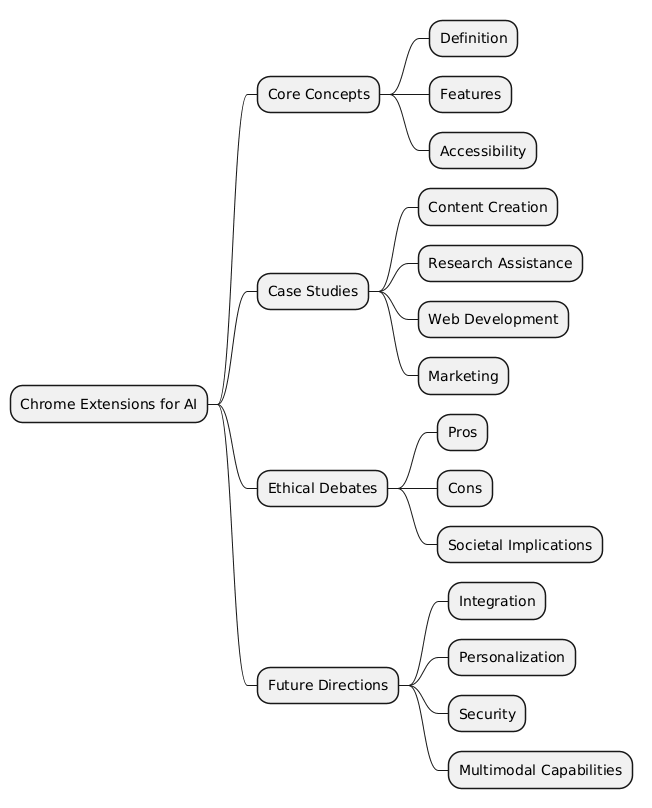
Mind Map
Key Takeaways
💡 Insightful Idea: Chrome extensions for AI simplify complex tasks, making advanced technologies accessible to all.
⚠️ Warning: Users must remain vigilant about data privacy and the ethical implications of AI usage.
🔍 Key Detail: Extensions like “ChatGPT for Google” and “Grammarly” exemplify the transformative potential of AI in everyday browsing.
🚀 Future Opportunity: The integration of multimodal AI capabilities could revolutionize digital workflows.
🌍 Societal Impact: While these tools democratize access to AI, they also raise critical questions about bias, privacy, and over-reliance.
By embracing Chrome extensions for AI, we stand on the cusp of a new era in digital innovation. These tools not only enhance productivity but also challenge us to navigate the ethical and societal complexities of AI integration. As we move forward, the balance between innovation and responsibility will define the true impact of these technologies.
Good shout.
Thank you for your feedback